A Shared Text and Music Accessibility Platform for Braille
Braille Hub is the completed evolution of a project that originally focused on Persian-to-Braille conversion.
The first generation of the work was built around a much narrower problem: converting Persian content into Braille. The modern Braille Hub project is substantially broader. It is now designed as a reusable accessibility platform with a shared translation Core, public SDK, music translation layer, Microsoft 365 integration, web distribution, Windows tooling, and a verified macOS installation path.
The central architectural decision is that Braille semantics should not belong to Word, Excel, PowerPoint, Windows or macOS individually.
Instead, all host environments consume the same shared engines.
This means that the product can grow without creating a separate translator for every platform.
Project links
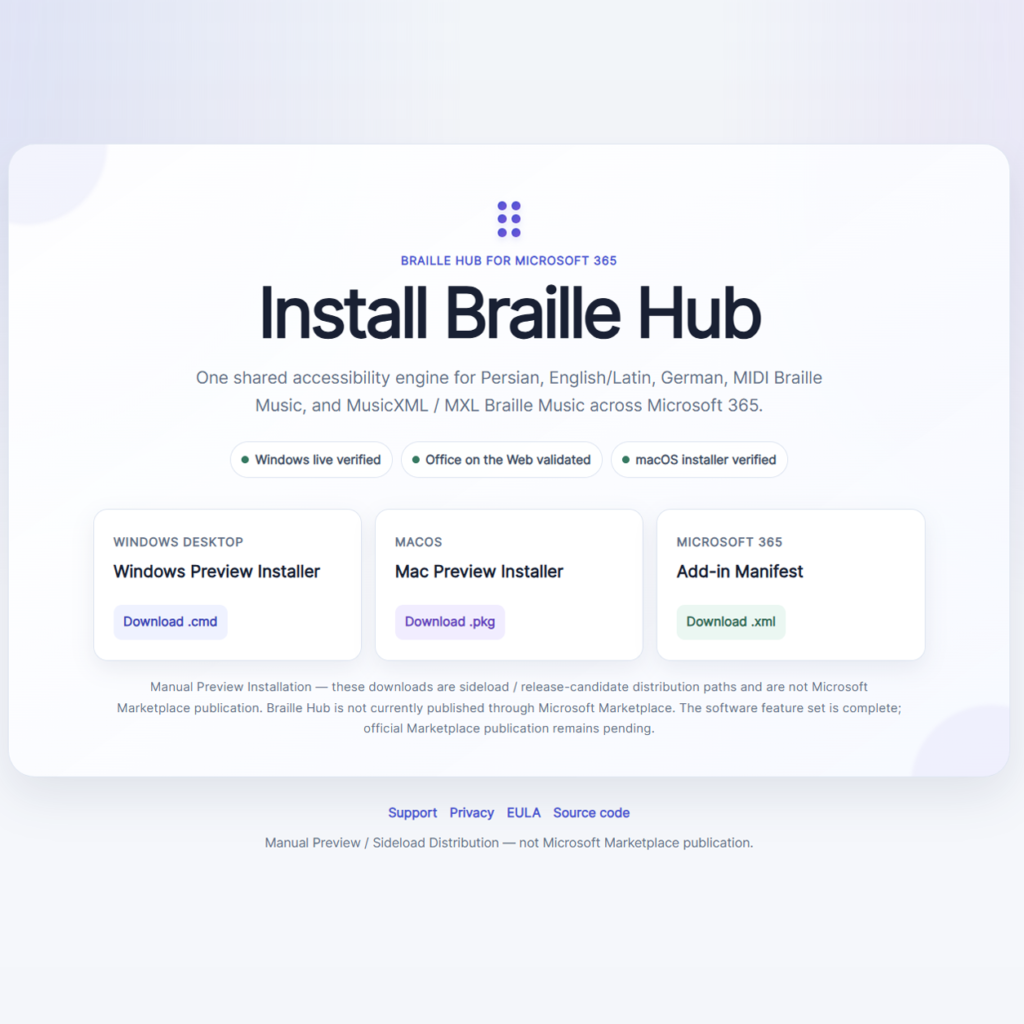
Main installation and download page:
https://soroushneyestani.github.io/Braille-Hub/install.html
GitHub repository:
https://github.com/soroushneyestani/Braille-Hub
Microsoft 365 production manifest:
https://soroushneyestani.github.io/Braille-Hub/install/manifest.xml
Windows preview installer:
macOS preview installer:
macOS release page:
https://github.com/soroushneyestani/Braille-Hub/releases/tag/mac-preview-v18.0.0-rc1
Support:
https://soroushneyestani.github.io/Braille-Hub/support.html
Privacy:
https://soroushneyestani.github.io/Braille-Hub/privacy.html
EULA:
https://soroushneyestani.github.io/Braille-Hub/eula.html
From Persian-to-Braille to Braille Hub
The original project name described its original scope accurately: Persian-to-Braille.
The modern system needed a different identity because it is no longer limited to one language, one host application or one direction of translation.
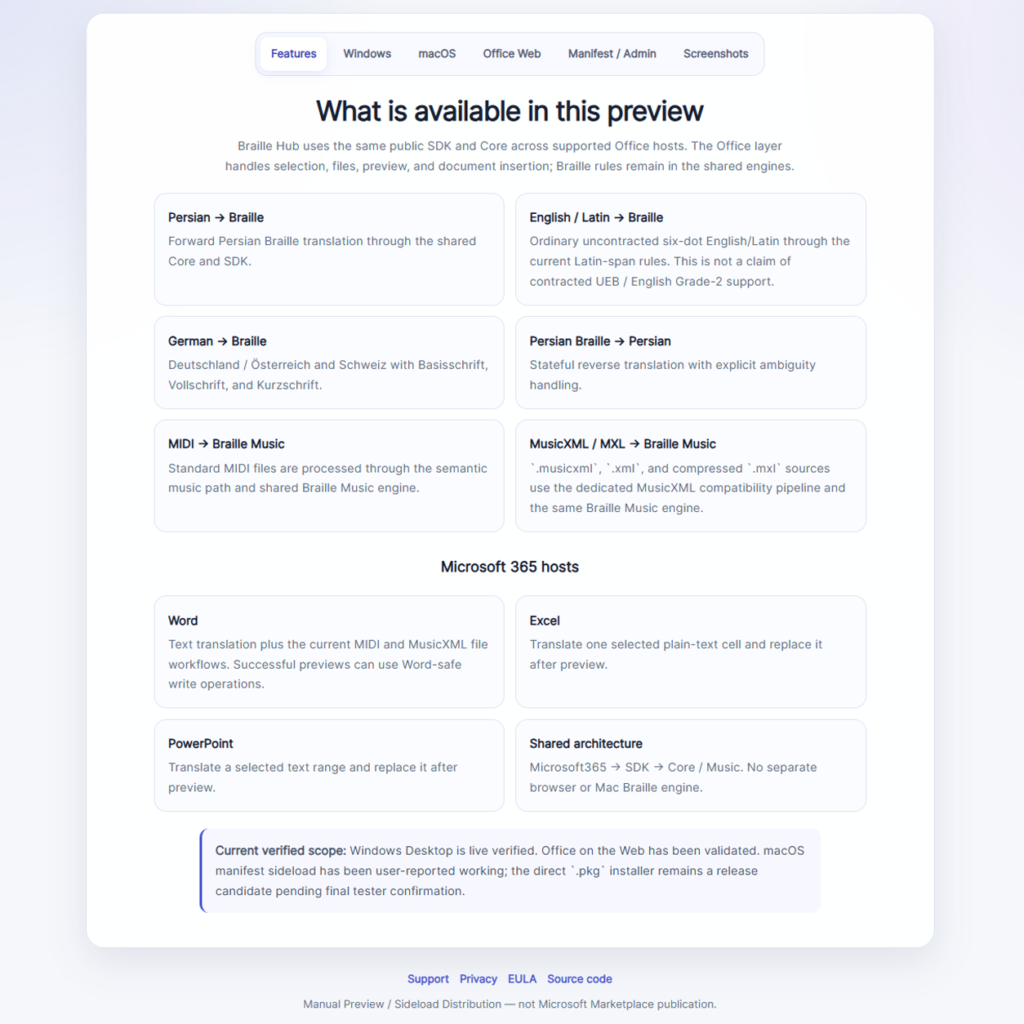
Braille Hub now brings together several accessibility domains:
- Persian Braille
- Persian Braille reverse translation
- English/Latin six-dot Braille
- German Braille
- Braille Music
- MIDI processing
- MusicXML and MXL processing
- Microsoft 365
- Windows distribution
- Office on the Web
- macOS distribution
- a reusable public SDK
The repository and product are therefore now published under the Braille Hub identity.
Historical Persian-to-Braille material remains part of the project history and standards evidence where appropriate, but it is no longer the active repository identity.
Core architecture
The modern codebase is built around a strict separation between accessibility semantics and application hosts.
At a simplified level:
Microsoft 365 → SDK → Core
↘ Music
The Core owns text Braille behavior.
The Music package owns MIDI, MusicXML, MXL and Braille Music behavior.
The SDK exposes stable public functionality to consumers.
Microsoft 365 implements host integration for Word, Excel and PowerPoint.
The Office layer does not duplicate Persian, German or music Braille rules.
This is an important distinction because accessibility software can become difficult to maintain when every application accumulates its own translation rules.
Braille Hub takes the opposite approach: one shared accessibility engine, multiple consumers.
Persian to Braille
Persian Braille remains one of the central components of the project.
The modern Persian engine is specification-driven. The repository contains explicit schemas, rule artifacts, conformance data, governance material, generated runtime bundles and validation tooling.
This is significantly different from treating translation as a collection of hard-coded string replacements.
The project separates historical evidence from current specification decisions, and it includes reproducibility and validation checks so generated specification artifacts can be rebuilt and compared deterministically.
The runtime produces Unicode Braille output and is shared by higher-level consumers such as the SDK and Microsoft 365 Add-in.
Persian Braille to Persian text
Braille Hub is not limited to forward translation.
A reverse Persian Braille path is also included.
Reverse translation requires different reasoning from ordinary text-to-Braille conversion because a Braille sequence may be ambiguous when converted back to ordinary text.
The reverse architecture therefore includes explicit policy and state handling rather than assuming that every cell sequence maps back to one uniquely determined textual form.
This gives the project a foundation for more robust two-way accessibility workflows.
English and Latin support
Braille Hub also includes English/Latin handling.
The current behavior is ordinary uncontracted six-dot Braille through the project’s Latin-span rules.
This should be described accurately: the current implementation is not presented as a complete contracted UEB/English Grade 2 engine.
That scope boundary is intentional.
It allows the project to provide useful Latin-text handling without claiming a standard or contraction profile that has not been implemented.
German Braille
German support is implemented as a dedicated Braille subsystem rather than a superficial character mapping.
The project supports:
- Basisschrift
- Vollschrift
- Kurzschrift
It also models regional behavior for Germany, Austria and Switzerland.
The German implementation is exposed through the same public SDK architecture used by Microsoft 365.
Within the Office Add-in, German has its own interface and controls for region and Braille level.
The implementation includes formal runtime artifacts, validation material and tests.
Braille Music
Braille Hub also expands beyond ordinary text.
The Music layer provides a dedicated path for translating musical source formats into Braille Music.
This is one of the reasons the product was renamed from Persian-to-Braille to Braille Hub: the project now handles accessibility domains that are independent of Persian text.
MIDI to Braille Music
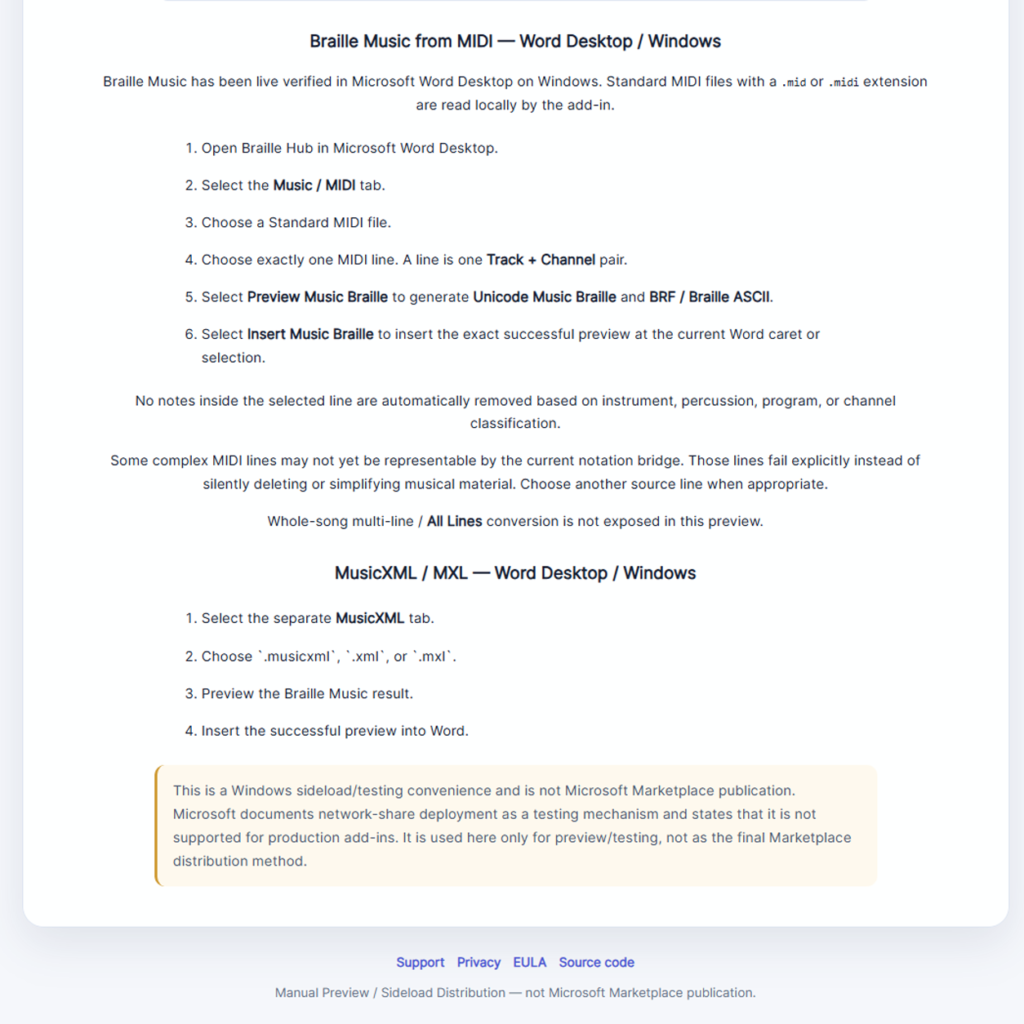
The MIDI workflow accepts .mid and .midi input.
Within Microsoft Word, the user can load MIDI data, inspect the source representation used by the Braille Hub workflow, select the relevant source line when necessary, preview the Braille Music translation and insert the exact successful preview into the document.
The implementation is routed through the shared public SDK and Music package rather than embedding a MIDI translator inside Word.
This preserves the same architectural boundary used elsewhere in the project.
MusicXML and MXL to Braille Music
Braille Hub also supports MusicXML-based input.
The current MusicXML compatibility profile supports:
.musicxml.xml.mxl
Compressed MXL input is handled through the asynchronous MusicXML path.
MusicXML is exposed as a separate user-facing workflow from MIDI. The two formats share the Music architecture but are not mixed into one interface.
The project deliberately uses a bounded compatibility profile rather than claiming universal support for every MusicXML construct ever produced by notation software.
Unsupported structures are expected to fail explicitly rather than silently generating unreliable Braille Music.
Microsoft 365 integration
Braille Hub includes an Office Add-in for Microsoft Word, Microsoft Excel and Microsoft PowerPoint.
The Add-in uses Office.js and a shared task-pane architecture.
The three Office hosts have different capabilities and therefore use host-specific adapters.
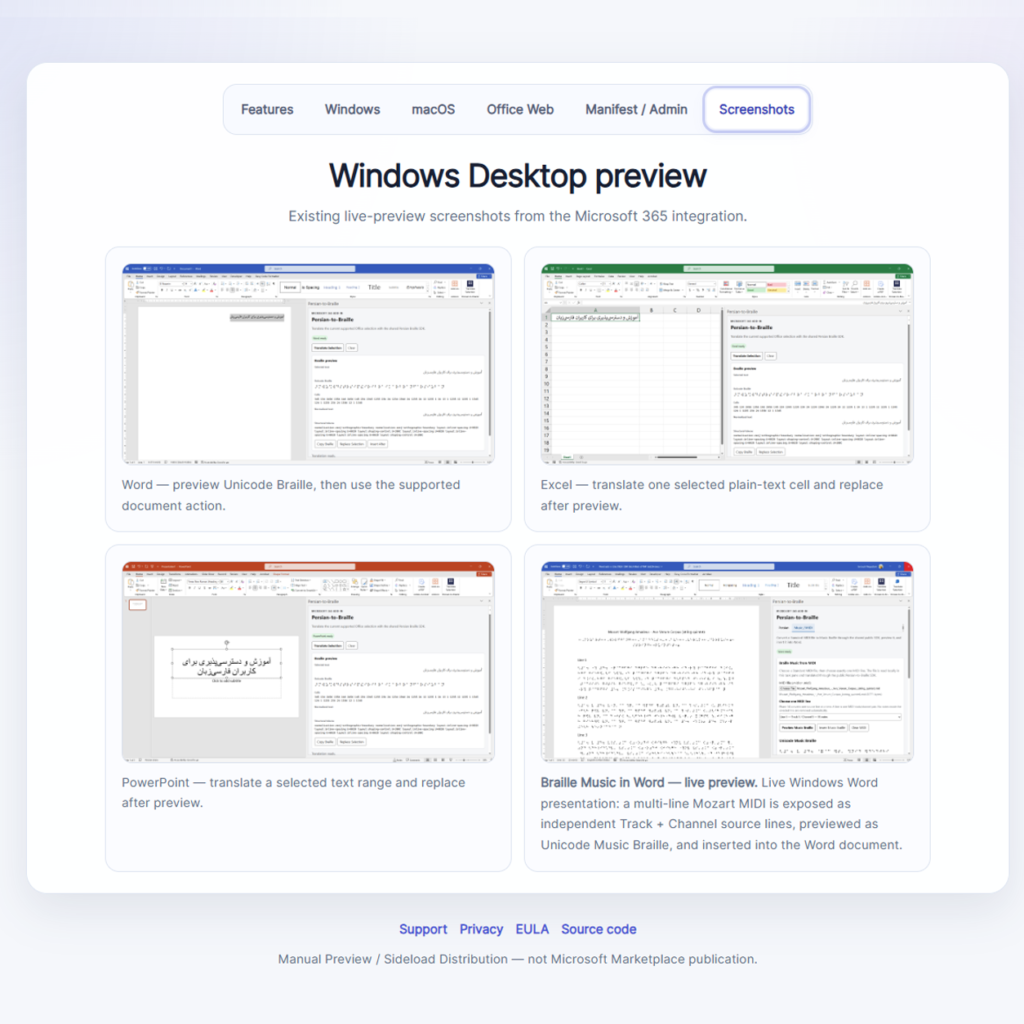
Microsoft Word
Word offers the broadest workflow.
It supports ordinary text translation, German Braille, music workflows, copying translated Braille, replacing selected text, and supported Word-specific insertion operations.
Word is also the host for MIDI and MusicXML Braille Music workflows.
Microsoft Excel
Excel supports plain-text cell translation.
The integration deliberately distinguishes plain text from formulas. A formula result that happens to display text is not silently treated as an ordinary editable source string.
This preserves predictable host semantics and avoids accidental replacement of formulas.
Microsoft PowerPoint
PowerPoint supports translation of selected text ranges and writes the exact successful Braille result back through the PowerPoint host API.
As with Word and Excel, the PowerPoint adapter does not contain Braille rules.
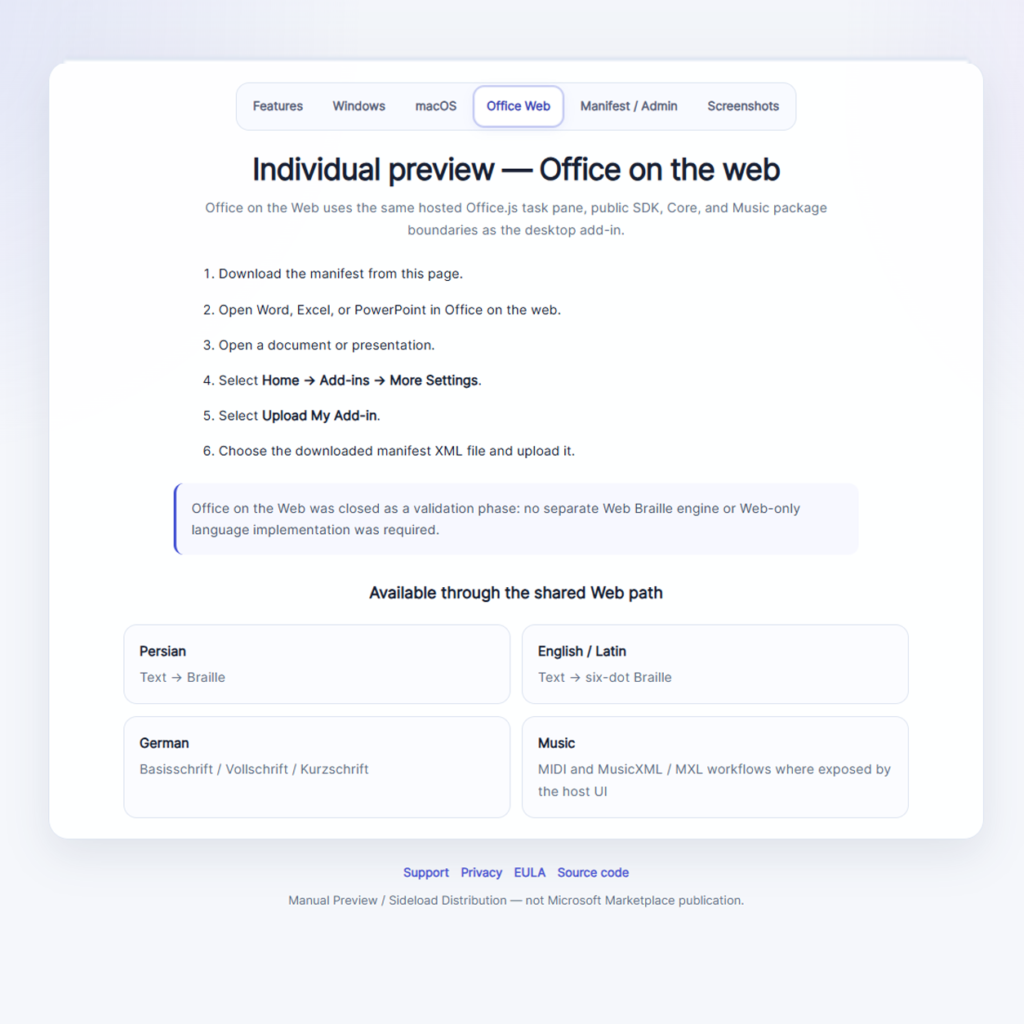
Office on the Web
The Microsoft 365 architecture was also validated for Office on the Web.
The public Add-in build uses Microsoft’s Office.js CDN and a browser-compatible dependency closure through the SDK, Core and Music packages.
This provides a web-hosted Office path without introducing a separate web translation engine.
Windows distribution
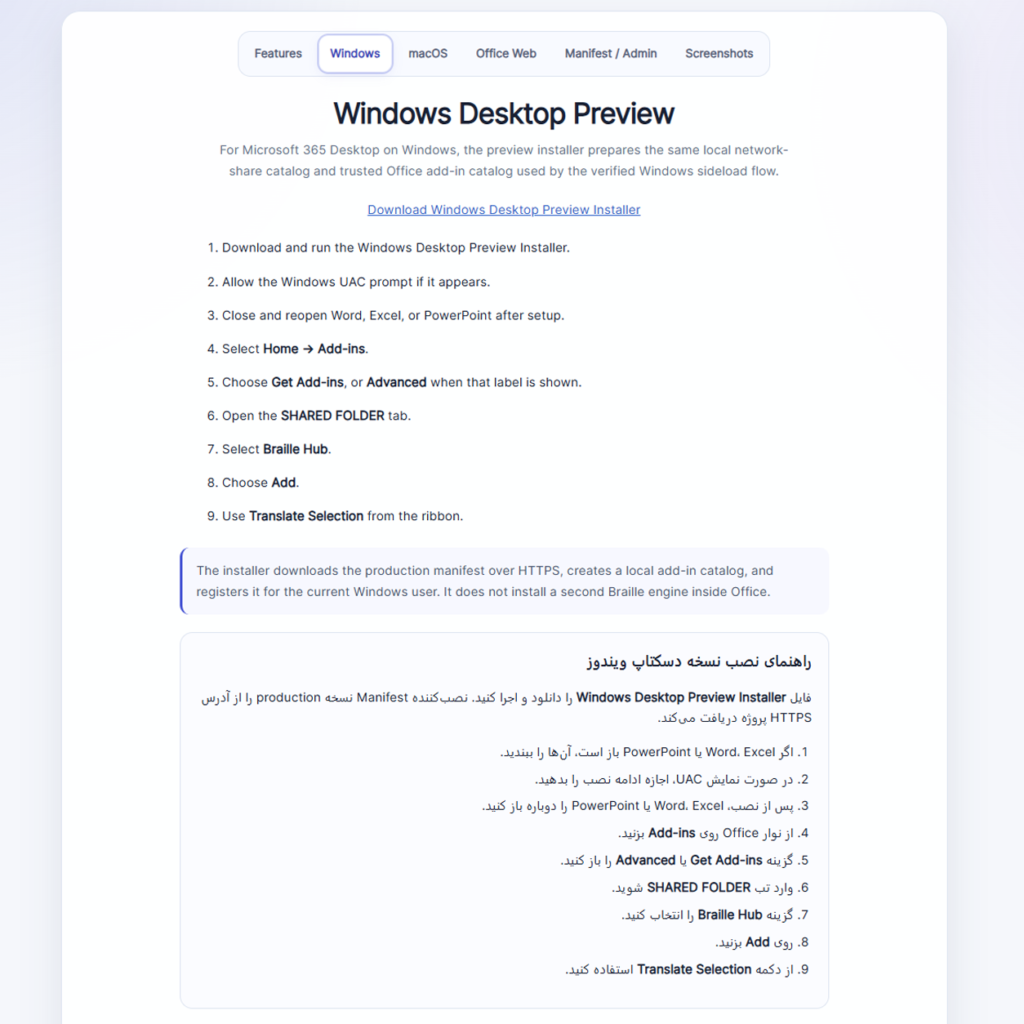
Braille Hub provides a Windows preview installer path for the Microsoft 365 Add-in.
Direct Windows installer:
The public installation page includes the Windows workflow and validated screenshots.
The Windows path remains part of the manual/sideload preview distribution rather than being described as a Microsoft Marketplace install.
macOS distribution
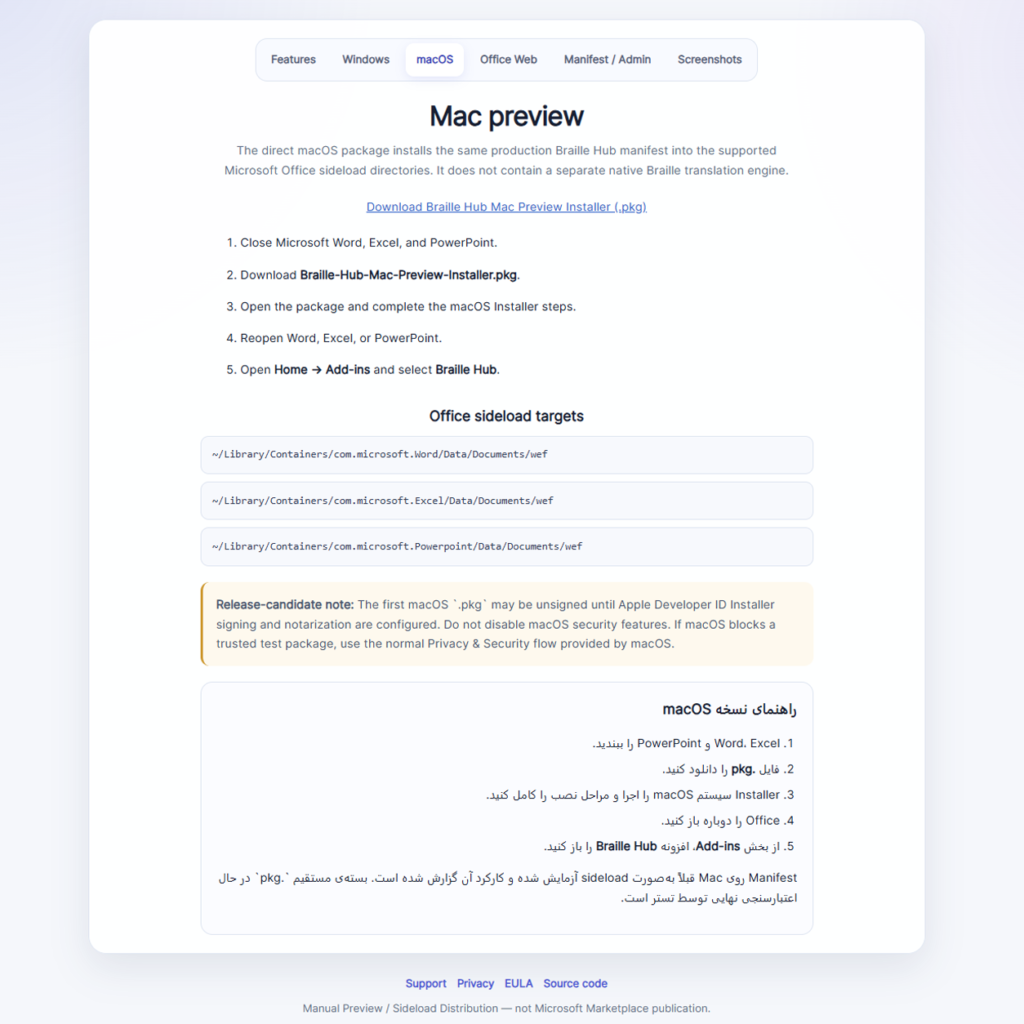
The project also provides a direct macOS .pkg installer.
Download:
The package installs the production Office manifest into the supported Microsoft Office sideload locations for Word, Excel and PowerPoint.
The installer is architecture-neutral because it does not contain a CPU-specific native Braille runtime.
The package was built through GitHub Actions and subsequently installed on a real Mac. The live installation path was verified.
The release also contains an uninstall command that removes Braille Hub manifests by exact Add-in identity rather than deleting unrelated Office XML files.
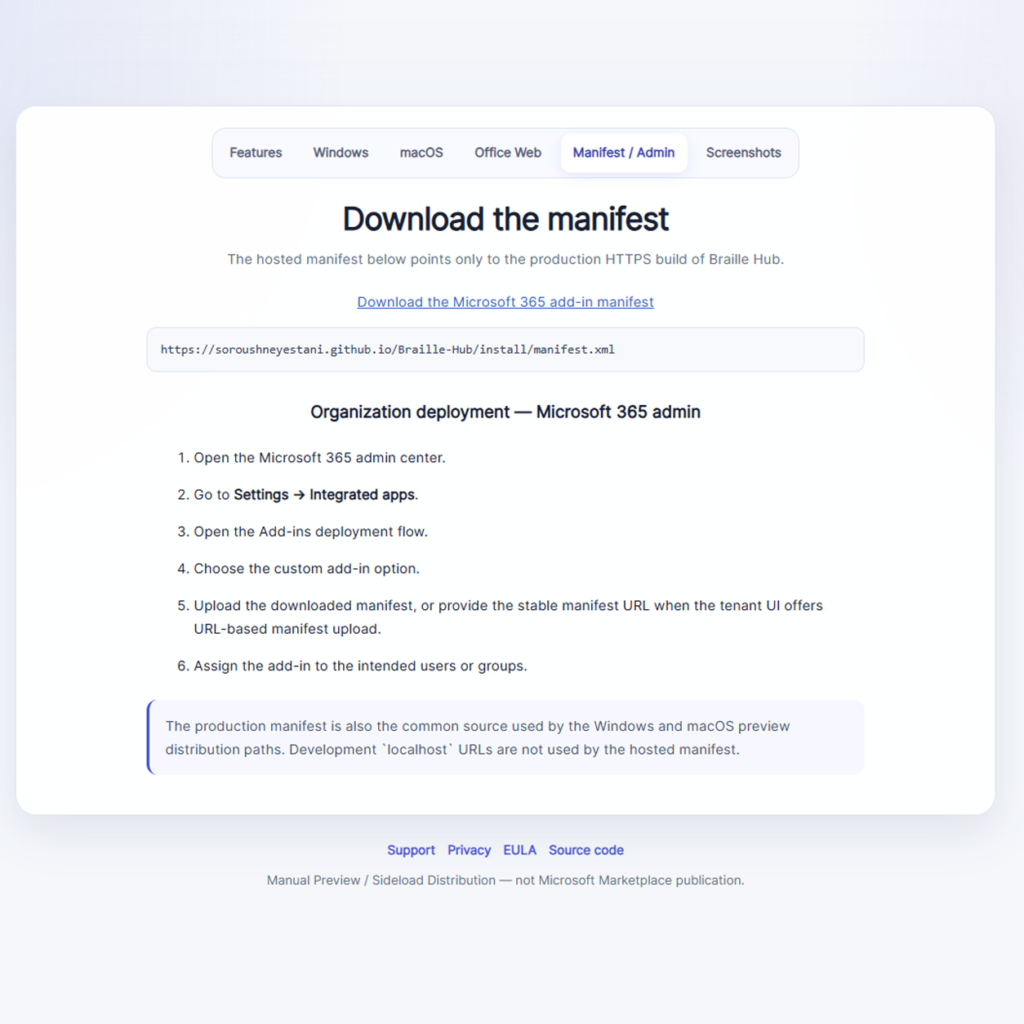
Public Microsoft 365 manifest
For users or administrators who prefer direct manifest deployment, Braille Hub publishes the production manifest here:
https://soroushneyestani.github.io/Braille-Hub/install/manifest.xml
This is the production-hosted manifest.
The development manifest remains separate and is not used as the public distribution manifest.
Distribution status
Braille Hub currently has a completed technical feature roadmap and a validated manual distribution path.
The current publication model should be described accurately:
- feature development: complete
- Windows preview distribution: available
- Office on the Web: validated
- macOS
.pkg: available and live-tested - production Microsoft 365 manifest: available
- public GitHub repository: available
- Microsoft Marketplace publication: pending as a separate publication step
- Apple Developer ID signing/notarization: not claimed for the current macOS preview package
This distinction is important because technically complete and published in a commercial app marketplace are not the same milestone.
The software development roadmap can be complete while Marketplace submission is still pending.
Testing and validation
Braille Hub was developed with extensive automated validation.
The project includes tests and validators covering:
- Persian translation behavior
- German Braille behavior
- reverse Persian Braille
- MIDI/Braille Music
- MusicXML/Braille Music
- Microsoft Word
- Microsoft Excel
- Microsoft PowerPoint
- Office build behavior
- Marketplace production manifest generation
- public manual-preview distribution
- specification reproducibility
- architecture boundaries
- Windows distribution
- macOS installer contracts
The final Microsoft 365 regression baseline passed 111 tests.
The public manual-preview distribution suite passed 12 tests after the Pages root/index regression was added.
The macOS installer static contract passes and the live Mac installation is marked verified.
Open-source structure
Braille Hub is developed as an open-source repository.
Repository:
https://github.com/soroushneyestani/Braille-Hub
The project uses a modular workspace that separates core translation logic, music processing, SDK functionality, host integrations, standards data, conformance material and tooling.
The public package identities under the @persian-braille namespace are retained for compatibility, even though the repository brand is now Braille Hub.
This avoids breaking package/API identity merely for branding reasons.
Why the architecture matters
Accessibility software often begins as a script or application-specific utility.
That can be effective for an initial problem, but it creates a long-term problem when the same logic must later work in multiple products.
If Word has one Persian Braille implementation, Excel has another, a website has a third, and a future desktop application has a fourth, differences inevitably appear.
Braille Hub avoids that duplication.
The goal is to make the translation engine reusable.
A consumer should ask the SDK to translate content rather than reimplementing the rules itself.
This makes it possible to add new integrations in the future without rebuilding the underlying accessibility semantics.
A platform rather than a single Add-in
The Microsoft 365 Add-in is an important part of Braille Hub, but it is not the whole project.
The deeper goal is a platform-independent accessibility core.
That core can support Office integrations, command-line tools, web applications, future desktop applications, third-party integrations, automated document-processing workflows, and educational or research tooling.
The public SDK is the bridge between the shared engines and those consumers.
Accessibility and transparency
Braille conversion is not a field where software should silently invent unsupported behavior.
For that reason, Braille Hub uses explicit scope boundaries.
Examples include:
- English/Latin support is not described as contracted UEB when it is not.
- MusicXML support is described as a bounded compatibility profile rather than universal MusicXML coverage.
- the macOS preview package does not claim notarization that has not been configured.
- the Microsoft 365 preview distribution is not described as a Marketplace publication before Marketplace submission.
- specification decisions are separated from historical evidence.
This transparency is part of the engineering approach of the project.
Project completion
The technical development roadmap for the current Braille Hub generation is complete.
The major phases covered the rebuilding of the Persian Braille foundation, specification and conformance work, SDK architecture, web and Office integrations, Windows distribution, developer ecosystem, reverse translation, Braille Music, German Braille, MusicXML, Office on the Web and finally the macOS installer.
The repository itself was then migrated from the historical Persian-to-Braille identity to Braille-Hub.
The active repository is:
https://github.com/soroushneyestani/Braille-Hub
The active public installation page is:
https://soroushneyestani.github.io/Braille-Hub/install.html
What comes next
The next major step is not another feature phase.
It is official distribution through Microsoft’s publication process.
Microsoft Marketplace / Partner Center publication will be handled as a separate release and compliance activity.
Future development after that point can be treated as maintenance, issue-driven improvements, standards extensions, or a new product version rather than continuing the completed roadmap indefinitely.
Download summary
Installation page:
https://soroushneyestani.github.io/Braille-Hub/install.html
Windows:
macOS:
Microsoft 365 Manifest:
https://soroushneyestani.github.io/Braille-Hub/install/manifest.xml
GitHub:
https://github.com/soroushneyestani/Braille-Hub
Support:
https://soroushneyestani.github.io/Braille-Hub/support.html
Privacy:
https://soroushneyestani.github.io/Braille-Hub/privacy.html
EULA:
https://soroushneyestani.github.io/Braille-Hub/eula.html
Braille Hub is now the shared home for the project’s text Braille, German Braille, reverse translation, Braille Music and Microsoft 365 accessibility work.