Bringing a Platform-Independent Persian Braille Core Back into Word, Excel, and PowerPoint
Persian-to-Braille originally began in 2016 as an Office-oriented translation tool.
A decade later, the project returned to Microsoft Office — but with almost the opposite architecture.
In the original implementation, Office macros and application-specific code owned a significant part of the translation behavior.
In the modern version, Microsoft Office owns none of the Persian Braille rules.
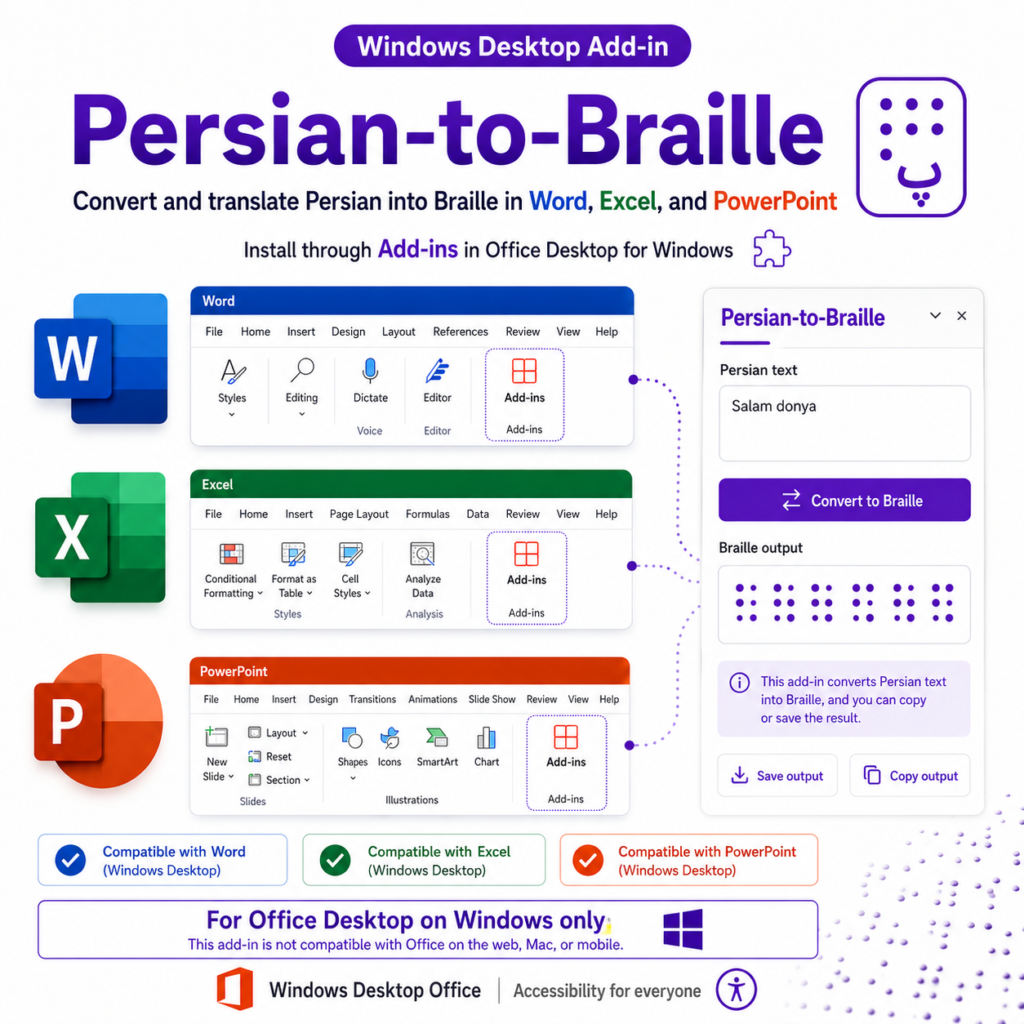
The current Windows Desktop integration supports:
Microsoft Word
Microsoft Excel
Microsoft PowerPoint
but all three applications depend on the same platform-independent translation stack:
Microsoft Office Integration
          ↓
Public TypeScript SDK
          ↓
Persian Braille Core
          ↓
Canonical Specification
This is an important milestone in the project because it demonstrates the purpose of the architectural redesign.
The Core was separated from applications so that new applications could be added without creating new translation implementations.
Microsoft Office is now one of those consumers.
From Office-Coupled Logic to a Reusable Platform
The historical project contained translation knowledge across multiple implementation sources, including:
Word VBA
Excel VBA
SQL
application-specific mappings
The legacy extraction identified:
46 Word VBA mappings
46 Excel VBA mappings
59 SQL mappings
42 exact matches across all three sources
There were also conflicts and partial overlaps.
The modern rebuild deliberately did not select one old implementation and declare it the standard.
Instead, historical implementations became evidence.
The new project introduced:
explicit rule records
evidence references
candidate and normative lifecycle states
conformance vectors
reproducible runtime generation
deterministic validation
public SDK contracts
That foundation is what made it possible to return to Microsoft Office without returning to an Office-owned translation architecture.
One Core for Three Office Hosts
Word, Excel, and PowerPoint do not contain separate Persian Braille mapping tables.
They all use the same public SDK.
Conceptually:
              Shared Task Pane
                     |
         +-----------+-----------+
         |           |           |
       Word        Excel     PowerPoint
         |           |           |
         +-----------+-----------+
                     |
                Public SDK
                     |
                     v
             Persian Braille Core
The host-specific layer is responsible only for concerns that actually belong to the Office host:
reading selections
validating host capabilities
capturing state
previewing results
writing back to documents
preventing stale writes
surfacing host-specific failures
Translation semantics remain outside that layer.
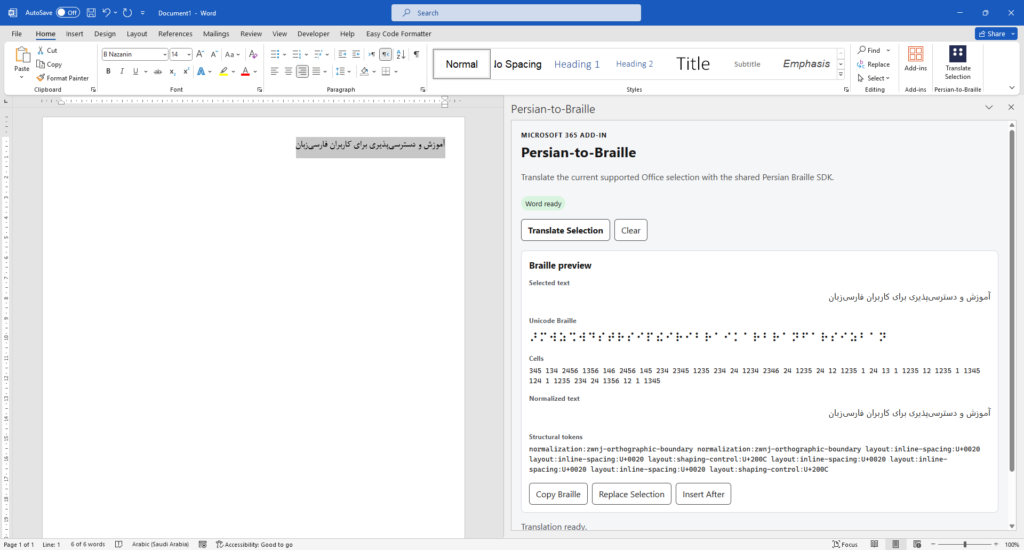
Microsoft Word
The Word integration is designed around WordApi 1.1.
A typical workflow is:
Read the current selected text.
Capture the exact selection state.
Send the text through the public Persian-to-Braille SDK.
Show the Unicode Braille result in the shared task pane.
Allow the result to be copied.
Replace the original selection if requested.
Optionally insert the Braille result after the selected text.
The important distinction is that Word performs document operations.
It does not perform Persian Braille translation.
Stale-Selection Protection in Word
Any feature that previews a transformation and applies it later has a potential race between preview state and current document state.
Suppose a user selects text and generates a Braille preview.
Before pressing Replace, the user changes the selection.
Applying the previous output blindly could now overwrite the wrong content.
The integration therefore verifies the selection again before mutation.
If the current state no longer matches the state used to generate the preview, the write is blocked.
This is a host-level safety contract.
The translation Core should not know what a Word selection is.
Word should not know how Persian Braille rules work.
Each layer owns the problem that belongs to it.
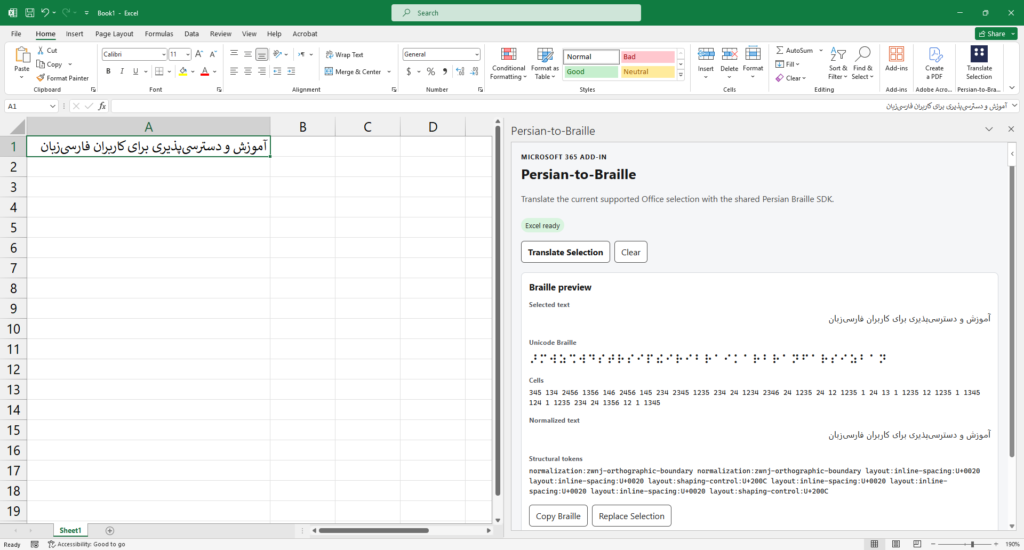
Microsoft Excel
Excel creates a very different host problem.
A selected cell may contain:
plain text
a number
a formula
a calculated result
or belong to a larger selected range
The current Excel contract is intentionally strict.
The integration accepts:
exactly one selected cell
plain text content
and rejects cases such as:
multi-cell selections
formula cells
non-string values
unsupported selection shapes
This strictness is deliberate.
The application does not silently coerce arbitrary spreadsheet values into translation input.
If the contract is plain text in a single cell, the host adapter enforces exactly that contract.
The translation itself still uses the same public SDK as Word and PowerPoint.
The current Excel mutation operation supports replacing the selected text cell after verifying that its state still matches the original preview snapshot.
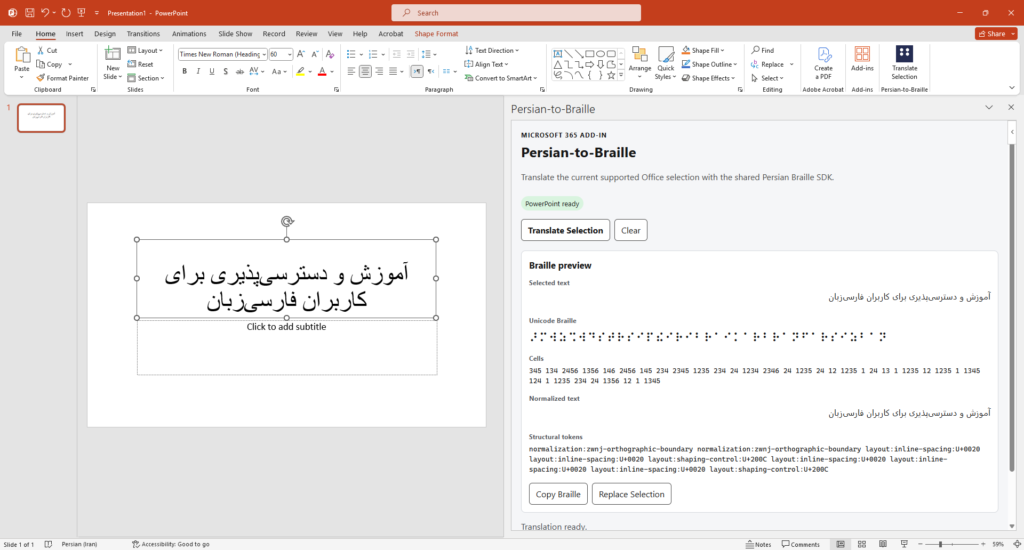
Microsoft PowerPoint
PowerPoint introduces another selection model entirely.
Selected text belongs to:
a particular slide
a particular shape
a particular text range
The integration therefore captures a five-part snapshot:
slideId
shapeId
start
length
text
Before replacing the selected text with Braille, the complete snapshot is checked again.
If the user moved to another shape, selected another text range, modified the text, or otherwise changed the original selection state, the mutation is blocked.
The current PowerPoint integration supports Replace Selection.
Again, none of this logic belongs in the Braille Core.
It belongs in the PowerPoint host layer.
A Shared Task Pane
Word, Excel, and PowerPoint use one shared task-pane application.
When Office initializes the integration, the current host is detected and operations are dispatched to the appropriate adapter and service.
Conceptually:
Office.onReady()
      |
      v
Shared Host Dispatch
      |
      +---- Word runtime/service
      |
      +---- Excel runtime/service
      |
      +---- PowerPoint runtime/service
      |
      v
Public Persian-to-Braille SDK
      |
      v
Persian Braille Core
This provides consistency at the user-interface level while still respecting the fact that Word selections, Excel cells, and PowerPoint text ranges are fundamentally different host abstractions.
Shared interface does not mean pretending every host behaves the same way.
The Canonical Rule Set at This Release
By the Windows Desktop release milestone, the canonical runtime contained:
176 total rules
139 candidate rules
37 normative rules
Rule categories include:
characters
context-sensitive behavior
sequences
layout
modes
normalization behavior
The runtime is generated from the canonical specification rather than maintained through separate application lookup tables.
The U+0622 Case: Why Governance Matters
One useful example of the architecture in practice appeared during Office verification.
The Persian character:
آ
U+0622
ARABIC LETTER ALEF WITH MADDA ABOVE
required an explicit runtime rule.
The release correction introduced:
Rule: FA-G1-VAR-001
Status: candidate
Input: U+0622
Braille dots: 345
Unicode Braille: U+281C (⠜)
Conformance vector: FA-CONF-VAR-001
Vector lifecycle: draft
The significant part is not only that the character became executable.
The project did not rewrite historical adjudication records or silently declare the new behavior normative.
The correction was introduced through a separate release-correction path.
That preserves a distinction that matters in specification-driven software:
Supporting a rule operationally and declaring a rule normatively authoritative are not the same action.
Release Validation
The Windows Desktop phase was closed only after validation across multiple layers.
Persian Braille Core
211 / 211 tests passed
Microsoft Office Integration
69 / 69 tests passed
The Microsoft 365 integration tests cover areas including:
Word behavior
Excel behavior
PowerPoint behavior
shared task-pane behavior
host dispatch
host adapters
stale-selection guards
SDK delegation
write-failure boundaries
The specification was regenerated repeatedly to confirm that the final canonical state reached the same deterministic fixed point.
Additional validated gates included:
Specification Validation: PASS
Conformance Validation: PASS
Runtime Validation: PASS
Architecture Validation: PASS
U+0622 Release Regression: PASS
Windows Package Integrity: PASS
Production Manifest Validation: PASS
HTTPS / No-Localhost Validation: PASS
GitHub Pull-Request Checks: 4 / 4 PASS
The milestone was formally closed as:
PHASE 11 WINDOWS DESKTOP — CLOSED / FINAL
Production Release Engineering
The Windows integration is not simply a development build connected to localhost.
The release path includes:
production Office manifest
HTTPS-hosted assets
support documentation
compliance pages
installation documentation
release screenshots
package provenance
checksums
CI-generated artifacts
Development-only localhost assumptions were explicitly removed from the production path.
The goal was a reproducible release package rather than a collection of files that only worked on the development machine.
Windows Desktop Preview Distribution
The current distribution is explicitly a:
Windows Desktop Preview / sideload release
It is not presented as Microsoft Marketplace publication or Microsoft certification.
An installation page and preview installer are available for the current release workflow.
Installation Guide
https://soroushneyestani.github.io/Persian-to-Braille/install.html
Windows Desktop Preview Installer
Current Platform Scope
The current Office release targets:
Microsoft Office Desktop on Windows
That boundary is intentional.
The current release does not claim support for:
Office on the Web
Microsoft Office / Microsoft 365 on macOS
mobile Office applications
official Microsoft Marketplace distribution
Those are separate future phases.
Defining this boundary explicitly is preferable to describing the software as “Microsoft 365 compatible” when only a specific host/runtime combination has actually been validated.
Open-Source Architecture
Persian-to-Braille is released under the MIT License.
More importantly, the project is structured so that Microsoft Office is not the architectural center of the system.
The Core and public SDK can support other consumers such as:
command-line tools
Web applications
accessibility software
educational tools
document-conversion systems
APIs
services
third-party integrations
research software
future developer tools
The Office integration is therefore an important application of the platform, but it is not the platform itself.
What Comes Next
The Windows Desktop Office milestone is complete.
Future areas are intentionally kept as separate project phases, including:
Developer Ecosystem
reverse Persian Braille translation
Braille music
multilingual/general Braille architecture
Office on the Web
Microsoft Office on macOS
Microsoft Marketplace / Partner Center publication
Keeping those phases separate protects the main architectural goal:
The Persian Braille specification and translation Core should never become dependent on a single user interface, platform, vendor, or distribution channel.
From Macros Back to Office — Without Going Backward
There is an interesting symmetry in this milestone.
The project began in Microsoft Office.
Then it was deliberately extracted from Office.
The translation rules became a specification.
The execution model became an independent Core.
The Core was wrapped in a public SDK.
The SDK gained CLI and Web consumers.
Only then did the project return to Word, Excel, and PowerPoint.
So visually, the story could appear to be:
2016: Office
2026: Office
Architecturally, almost everything between those two points has changed.
The modern Office integration is no longer where Persian Braille knowledge lives.
It is simply another client of a reusable translation platform.
That is the real milestone.
Source Code
GitHub:
https://github.com/soroushneyestani/Persian-to-Braille
License: MIT
Current release: Microsoft Office Desktop on Windows — Word, Excel, and PowerPoint.