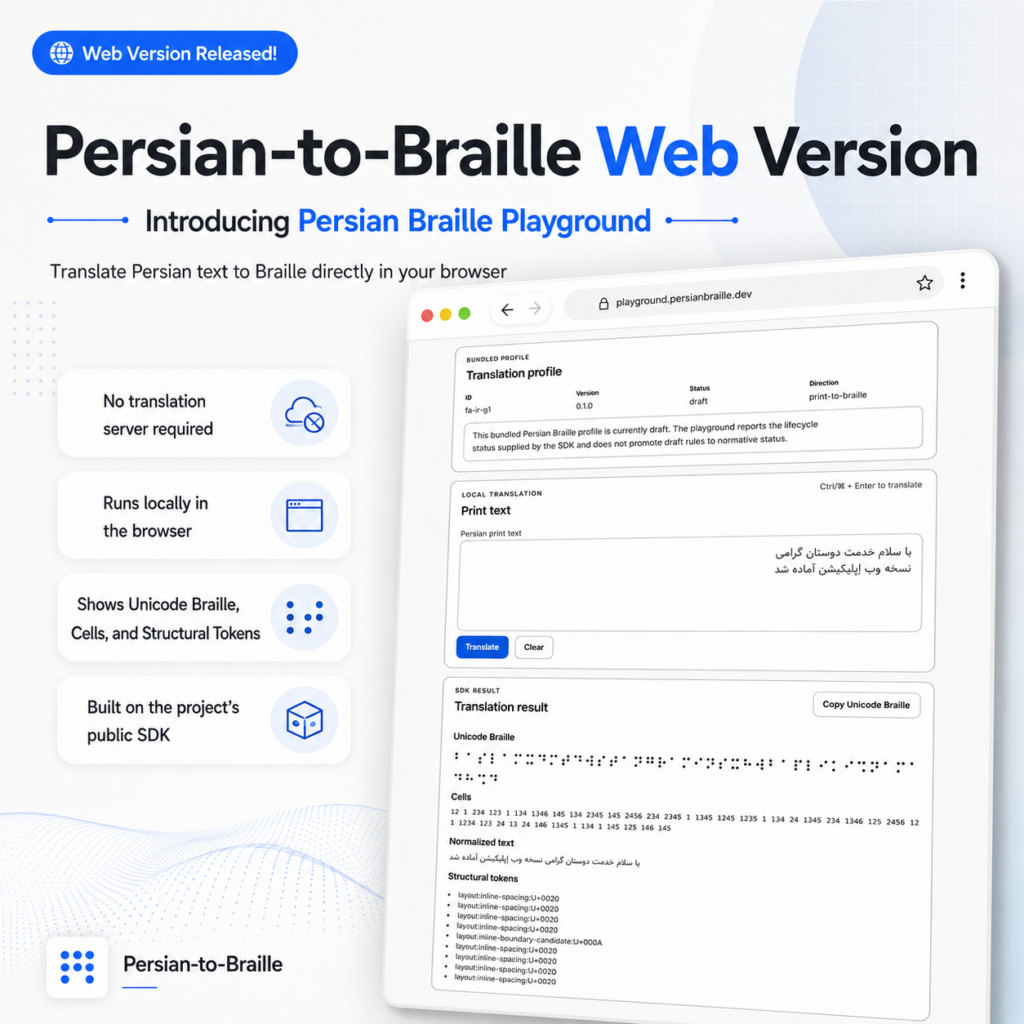
Running the Persian Braille Translation Stack Directly in the Browser
After completing the first command-line consumer of the rebuilt Persian-to-Braille architecture, the next question was straightforward:
Can the same translation system run inside a browser without creating a second implementation of Persian Braille?
The answer became the Persian-to-Braille Web Playground.
At first glance, it is a simple browser application: enter Persian text, translate it, inspect the Braille result, and copy the output.
Architecturally, however, the more important feature is what the Web application does not contain.
It does not contain another Persian Braille mapping table.
It does not implement separate normalization logic.
It does not maintain Web-specific translation rules.
It does not reinterpret failures.
And it does not send input to a dedicated translation server.
The browser is simply another consumer of the same public software architecture.
One Translation Stack, Another Consumer
The architecture remains:
Canonical Specification
        ↓
Translation Core
        ↓
Public TypeScript SDK
        ↓
Web Playground
The core rule of the Web implementation is:
The browser application presents translation results. It does not define translation semantics.
That distinction prevents one of the most common problems in multi-interface software systems.
A project starts with one implementation.
Then the Web application introduces a small convenience transformation.
The CLI gets another special case.
A desktop client implements a third.
Over time, every interface appears to support the same feature while actually executing subtly different rules.
Persian-to-Braille is designed specifically to avoid that drift.
What the Playground Exposes
The Web application accepts Persian print text and passes it through the public SDK.
The current public result can expose:
Unicode Braille
Braille cells
Normalized text
Structural tokens
Translation profile metadata
Structured translation failures
The user interface provides actions including:
Translate
Clear
Copy Unicode Braille
The important point is that these values are not reconstructed independently by the browser.
For example, the UI does not derive cell notation again from Unicode Braille.
It does not independently normalize Persian text.
It does not calculate structural tokens itself.
Those values come from the public translation result.
The browser displays the contract rather than redefining it.
Browser-Local Translation
One of the defining characteristics of the current Web Playground is its execution model.
Translation runs locally in the browser.
The application contract explicitly defines:
runtime: browser-local
translationNetworkRequests: false
inputPersistence: none
There is no dedicated translation backend for this phase.
Persian text is not sent to a remote server for conversion.
The runtime required to execute the Core and SDK is delivered to the browser and runs there.
This keeps the architecture smaller and significantly reduces the privacy surface of the application.
Privacy by Architecture
The Web Playground was intentionally designed without:
user accounts
authentication
server-side translation history
persistent application history
analytics requirements
translation API calls
service-worker complexity
PWA behavior
Entered translation text is not stored by the application as persistent history in:
localStorage
sessionStorage
This is not presented as an absolute privacy guarantee for every possible browser or hosting environment.
It is a specific architectural property of the application itself:
the translation feature does not require the user’s Persian text to be sent to a translation backend or persisted as application history.
That behavior exists because the software architecture allows it, not because a privacy message was added after implementation.
Accessibility as Functional Behavior
Because Persian-to-Braille is itself an accessibility project, I did not want accessibility to exist only as a topic or visual theme.
It needed to influence application behavior.
The Web Playground therefore includes considerations such as:
native HTML form controls
explicit input labeling
keyboard-operable actions
visible keyboard focus
selectable textual Braille output
structured textual error information
live status feedback for clipboard operations
assertive accessible messaging for translation failures
responsive presentation
Translation can also be triggered from the keyboard using:
Ctrl + Enter
Command + Enter
depending on platform.
The goal is not to create a custom interaction system when native browser behavior already provides predictable and accessible semantics.
Translation Failure Is a Result, Not a Generic Error
The Web interface does not reduce all unsuccessful translations to:
Something went wrong.
Expected translation failures are part of the public SDK contract.
Where available, the interface can expose information such as:
failure code
message
code-point index
UTF-16 index
character
Unicode code point
candidate information
cause information
This is useful for both users and developers.
If the current profile cannot translate a particular character, the application should report that condition accurately.
It should not silently delete the character.
It should not substitute something that looks similar.
And it should not introduce a Web-only fallback.
A trustworthy consumer reports what the translation engine actually knows.
The Translation Profile Is Visible
The Web application also displays the bundled profile metadata.
At this milestone:
id: fa-ir-g1
version: 0.1.0
status: draft
direction: print-to-braille
The draft lifecycle is intentionally visible.
A profile becoming executable does not automatically make every rule inside it a normative Persian Braille standard.
This separation is important to the governance of the project:
software readiness and normative language status are different concerns.
The interface reflects the state provided by the SDK rather than silently presenting an unfinished profile as authoritative.
State Management Matters
Even a small interface contains behaviors that can become correctness problems.
For example, the Copy Unicode Braille action only operates on the current successful translation.
If a previous translation succeeded but a later translation fails, the old successful result is no longer silently treated as the active copy candidate.
This prevents a subtle failure mode:
the interface could visually display an error while copying a stale result from an earlier request.
Similarly, Clear resets:
input
current result
copy feedback
current copy candidate
and returns focus to the input field.
These behaviors are tested rather than assumed.
A Deliberately Small Frontend Stack
The current Playground does not use React, Angular, Vue, or another large frontend framework.
That was an intentional engineering choice for this phase.
The current implementation uses:
TypeScript
native ES modules
browser import maps
static HTML
CSS
Node built-ins for build assembly and preview
The requirement was a thin browser consumer of an existing SDK.
Introducing a larger framework simply because the project now had a browser interface would not improve the translation architecture.
A framework can be introduced later if application complexity provides a real reason for it.
The architecture should determine the tooling — not the other way around.
Preserving Package Boundaries in the Browser
At source level, the Web application depends on the public SDK:
web → sdk
It does not bypass that public boundary:
web → core
Internally, the SDK depends on Core, so the static browser build must make both compiled runtime packages available.
Browser import maps allow the existing package graph to execute without turning the Web application into a direct Core consumer.
This distinction is enforced by repository architecture validation.
That means the browser implementation cannot gradually reach into Core internals simply because doing so would be convenient.
Clean-State Static Builds
The browser application has a genuine static build.
The dependency path is:
Core
 ↓
SDK
 ↓
Web
The resulting dist contains the browser application and the compiled runtime dependencies required to execute translation locally.
The build process is also validated from a clean state.
It should not succeed only because compiled artifacts from a previous developer session happened to remain on disk.
This is part of the same reproducibility philosophy used across the rest of Persian-to-Braille.
Cross-Consumer Consistency
At this stage, Persian-to-Braille had two major application consumers:
           Public SDK
              ↓
        ┌─────┴─────┐
        ↓           ↓
       CLI         Web
The project therefore added explicit integration testing for consumer parity.
For the same input, results are compared across:
the public SDK
CLI JSON output
Web projection
Relevant fields include:
unicodeBraille
cells
normalizedText
structuralTokens
profile metadata
failure code
This protects against a subtle architectural problem:
two applications can each pass their own tests and still disagree with one another.
Cross-consumer validation exists to prevent that divergence.
Validation at the Web Milestone
At the closure point for the Web Playground, validation included:
Core tests:                    210 / 210
SDK tests:                      12 / 12
CLI tests:                      13 / 13
Web tests:                      13 / 13
Consumer integration tests:     8 / 8
Conformance tests:              22 / 22
Profile scenarios:              15 / 15
Repository-level checks also covered:
normalization
architecture boundaries
runtime specification consumption
SDK packaging
clean-state reproducibility
repository hygiene
GitHub CI
The Web application is therefore not a detached visual prototype.
It is part of the validated translation architecture.
What This Milestone Actually Demonstrates
The obvious description of the project is:
Persian text can now be translated to Braille in a Web browser.
That is true.
But the more significant engineering result is:
A browser application can consume the Persian-to-Braille translation platform without owning any Persian Braille rules itself.
The interface can change.
The visual design can change.
The browser technology can change.
Another frontend framework could eventually replace the current implementation.
The translation authority remains below the application boundary.
That is the architectural property I wanted this milestone to demonstrate.
Repository
GitHub:
https://github.com/soroushneyestani/Persian-to-Braille
The Web Playground is part of the open-source Persian-to-Braille platform and is built around browser-local execution, explicit software boundaries, accessibility, Unicode correctness, and a shared public translation SDK.